

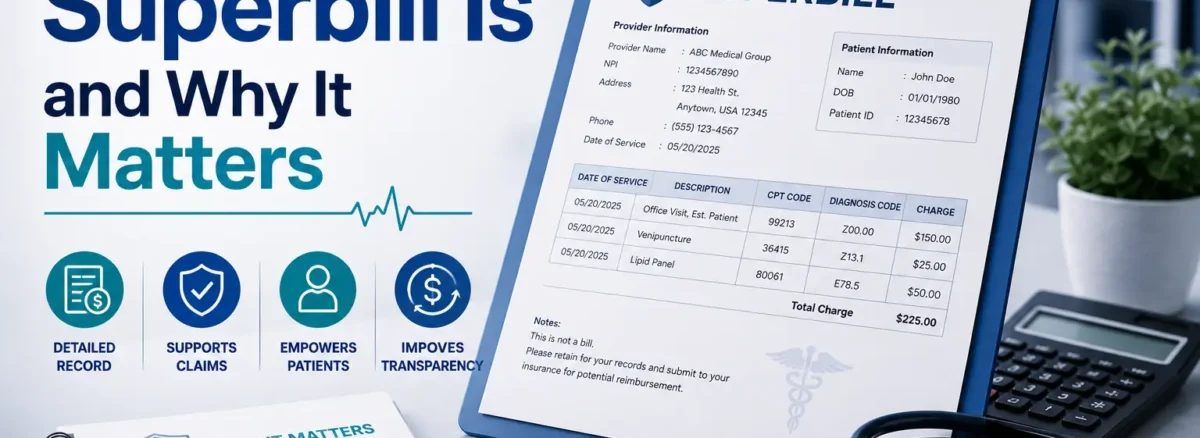
A superbill is a detailed receipt that providers give patients, listing diagnosis codes (ICD-10), procedure codes (CPT/HCPCS), charges, and service dates for submitting to insurance. It’s essential for out-of-network reimbursement.
Common in cash-pay practices, therapists, chiropractors, and independents do not directly bill payers. Patients pay upfront, then use the superbill to seek refunds—shifting claims work to them.
A superbill helps convert clinical services into insurance-ready billing information, streamlining flexible models. Unlike invoices, it’s code-rich for payers.
Superbills boost cash flow (paid at visit) while aiding patients—win-win for non-par. Customize via EHR templates.
In this article, we’ll explain what a superbill is, how providers use it, what information it includes, and common billing mistakes to avoid.
Why Providers Use Superbills
Superbills give practices flexibility: the provider gets paid directly, and the patient still has a path to insurance reimbursement. They are especially helpful for out-of-network providers, cash-pay practices, and independent specialists who choose not to contract with every payer.
Here’s how they help in real life:
| Use Case | Why Superbills Help |
| Out-of-network care | Let patients request reimbursement |
| Cash-pay practices | Simplifies insurance claim filing |
| Specialty clinics | Supports clean documentation |
Therapists, chiropractors, dietitians, and independent specialists often rely on superbills to keep admin overhead low while still supporting patients who want to use their benefits. Superbills also serve as strong documentation for what was done and why, which can be useful for audits or patient questions. Superbills are especially useful when providers do not bill insurance directly, because they bridge the gap between a clinical encounter and the insurance system.
What Information Is Included in a Superbill?
A superbill needs specific details to turn a patient visit into something an insurance company can understand and process. When done well, it clearly shows who provided care, what was done, why it was done, when, and how much was charged.
At a minimum, a complete superbill should include:
- Provider name, address, and NPI
- Practice Tax ID (EIN)
- Patient name, DOB, and contact details
- Date of service
- CPT/HCPCS codes for services performed
- ICD-10 diagnosis codes explaining medical necessity
- Modifiers (if applicable, e.g., telehealth, bilateral, prolonged service)
- Amount charged and amount paid by the patient
Here’s a simple view of a few key elements:
| Element | Purpose |
| CPT/HCPCS codes | Describe the services performed |
| ICD-10 codes | Explain the diagnosis/condition |
| NPI | Identify the specific provider |
| Charges | Show what to reimburse |
Missing or incorrect information can delay reimbursement, cause partial payment, or lead to denials. That’s why many practices use standardized superbill templates or EHR-generated superbills to reduce errors and keep the format consistent for patients.
How the Superbill Process Works (Step-by-Step Workflow)
A superbill fits into a simple, repeatable workflow that lets the provider stay “cash-pay” while still supporting patients who want to use their insurance. Superbills shift reimbursement responsibility from the provider to the patient, which is why the process needs to be clear and consistent.
Here’s how it typically works:
- The provider sees the patient
The visit occurs as usual: evaluation, treatment, counseling, or procedure. - Services are documented
The provider (or staff) records what was done, why it was done, and for how long in the chart or EHR. - Superbill is created
Using the documentation, the practice generates a superbill that includes CPT/HCPCS codes, ICD-10 codes, charges, dates, and provider identifiers. - Patient receives the superbill
The superbill is given to the patient—printed, sent via portal, or emailed securely—after payment is collected. - Patient submits to insurance
The patient sends the superbill to their insurance company, often through a member portal, mail, or app. - Insurance reviews the claim
The payer treats the superbill like a member-submitted claim: they review codes, coverage, and out-of-network benefits. - Reimbursement is sent to the patient
If approved, the insurer reimburses the patient directly, based on their plan’s out-of-network rules and deductibles.
In many cases, the provider is paid upfront by the patient at the time of service, which protects practice cash flow while still giving patients a fair chance at reimbursement.
Superbill vs CMS-1500 vs Invoice (Important Comparison)
Many healthcare providers use the terms superbill, CMS-1500, and invoice interchangeably, but these documents serve very different purposes in the medical billing process.
Understanding the difference is important because using the wrong document can lead to:
- Claim delays
- Patient confusion
- Reimbursement issues
- Billing workflow problems
Here’s a simple comparison:
| Document | Main Purpose |
| Superbill | Helps patients request insurance reimbursement |
| CMS-1500 | Used by providers to bill insurance directly |
| Invoice | Requests payment from the patient |
Superbill
A superbill is a detailed document that providers give to patients after a visit. It contains insurance-ready information such as:
- CPT/HCPCS procedure codes
- ICD-10 diagnosis codes
- Provider information
- Date of service
- Charges paid
Superbills are most commonly used in:
- Out-of-network practices
- Cash-pay clinics
- Therapy and specialty practices
Instead of the provider submitting the claim directly, the patient sends the superbill to their insurance company for possible reimbursement.
CMS-1500 Form
The CMS-1500 is the standard claim form that providers use to bill insurance companies directly.
Unlike a superbill:
- The provider or billing company submits the form
- The insurance payer processes the claim directly
- Payment is usually sent to the provider
CMS-1500 forms are commonly used by:
- In-network providers
- Hospitals
- Medical billing companies
- RCM teams
This form requires accurate payer information, coding, and billing details to avoid denials.
Invoice
An invoice is simply a request for payment sent to the patient.
It usually includes:
- Service descriptions
- Amount due
- Payment instructions
However, invoices generally do not contain:
- CPT codes
- ICD-10 codes
- Insurance billing information
Because of this, patients typically cannot use a standard invoice to request insurance reimbursement.
Why This Difference Matters
Choosing the correct billing document helps providers:
- Improve billing accuracy
- Reduce reimbursement delays
- Create smoother patient billing workflows
- Support better revenue cycle management
For example:
- An out-of-network therapist may issue a superbill
- An in-network clinic usually submits a CMS-1500 form
- A cash-pay clinic may only provide an invoice
Common Superbill Mistakes That Delay Reimbursement
Small errors on a superbill can lead to reimbursement delays, denials, or patient confusion. Since insurance companies rely on the information listed on the superbill, accuracy is critical.
Here are some of the most common mistakes providers should avoid:
| Common Mistake | Possible Impact |
| Missing CPT codes | The claim may be rejected |
| Incorrect ICD-10 codes | Reimbursement denial |
| Missing NPI or Tax ID | Provider verification issues |
| Wrong patient information | Processing delays |
| Missing modifiers | Incorrect reimbursement |
Common Issues Providers Face
- Incorrect or outdated CPT/HCPCS codes
- Diagnosis codes that do not support the service billed
- Missing provider details like NPI or Tax ID
- Incomplete patient demographics
- Missing modifiers for certain procedures
Even small documentation mistakes can slow down the reimbursement process.
Tips to Reduce Superbill Errors
Providers can improve billing accuracy by:
- Using standardized superbill templates
- Double-checking CPT and ICD-10 codes
- Verifying patient and provider information
- Reviewing modifiers before issuing the superbill
How a Provider Uses a Superbill: Examples
Superbills are commonly used in out-of-network and cash-pay practices where providers collect payment directly from the patient instead of billing insurance themselves.
For example, imagine a therapist who operates as an out-of-network provider.
Here’s how the process works:
- The patient attends the appointment
- The patient pays for the visit up front
- The provider creates a superbill containing:
- CPT codes
- ICD-10 diagnosis codes
- Provider information
- Charges paid
- The patient submits the superbill to their insurance company
- The insurance company reviews the information and may reimburse part of the cost directly to the patient
In this workflow, the provider receives payment immediately, while the patient handles the reimbursement request separately.
This model is common in:
- Therapy practices
- Chiropractic clinics
- Independent specialty practices
- Cash-pay healthcare settings
How MedAce Can Help With Accurate Billing Documentation
Creating accurate superbills is an important part of maintaining smooth reimbursement workflows and reducing billing delays. Incorrect coding, missing information, or documentation errors can slow down payments and create unnecessary administrative work for providers and staff.
At MedAce, we help healthcare practices improve billing accuracy and streamline revenue cycle operations through:
- Accurate CPT and ICD-10 coding support
- Billing documentation guidance
- Claim and reimbursement workflow optimization
- Reduced coding and submission errors
- Support for cleaner revenue cycle processes
Whether your practice uses superbills for out-of-network reimbursement, cash-pay services, or specialty billing workflows, having the right billing support can improve efficiency and reduce reimbursement problems.