
Healthcare providers deal with lots of paperwork every day. Insurance companies ask for the same info again and again—like your licenses, work history, and malpractice insurance—for getting approved to treat patients and bill them.
What Is CAQH? It’s the Council for Affordable Quality Healthcare, a non-profit group that makes a safe online place to keep and share your details with insurers.
CAQH helps with credentialing by letting you enter info once. Then, many insurance companies can see it right away. This means quicker okay’s, easier contracts, and faster payments. Without it, things take longer and can cause problems with claims.
CAQH is free for providers and keeps your info safe. You decide who sees it. It’s a simple way to save time and focus more on caring for patients.
What Is CAQH ProView?
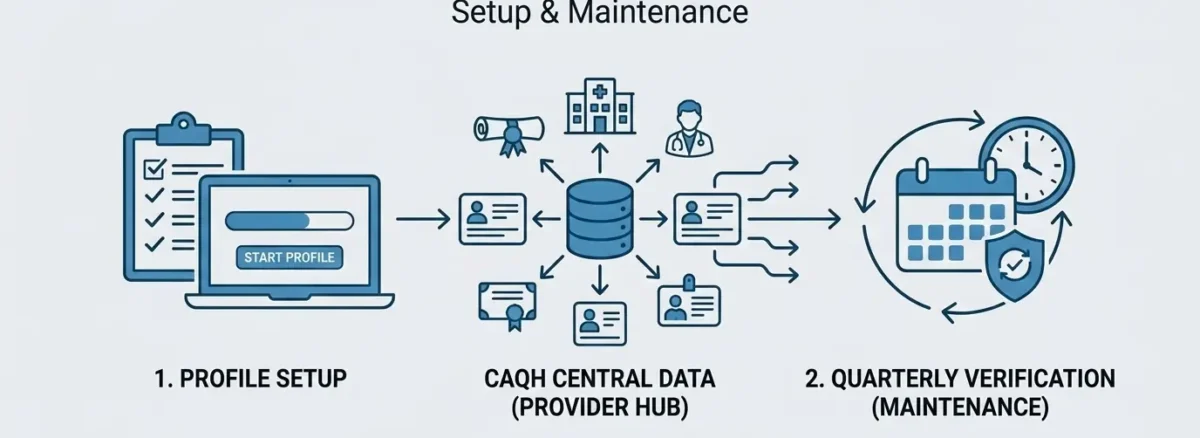
CAQH ProView is the main tool in the CAQH system. It’s a free online profile where you put all your provider details in one spot. You enter info like your name, address, education, licenses, and insurance coverage. Payers—insurance companies—check this profile to approve you for their plans.
Once set up, you don’t repeat the work for each insurer. They pull the data directly, which saves time and cuts mistakes. For example, update your license expiration here, and everyone sees it fast. ProView keeps your info secure and lets you track who views it. It’s easy to use and key to smooth credentialing.
Why Providers Need a CAQH Profile
Most insurance companies require a CAQH profile to work with them. It’s the standard way they check your credentials before letting you join their network. A good profile speeds up approvals. Payers see your licenses, history, and other details fast, so you get contracts and payments sooner. Without it, you face long waits or denials.
It also helps with ongoing needs, like renewals or adding new locations. Keep it current, and you avoid claim rejections or lost revenue. In short, a CAQH profile is a must for any provider who bills insurance. It simplifies life and keeps your practice growing.
Documents & Information Required for CAQH Setup
This section is key because missing or wrong details can hold up your entire profile. Take time to collect everything accurately before starting. Most items come from your records, licenses, or insurance papers.
Here’s a full list of what’s typically required, grouped for ease.
Personal and Identifier Details
- Full legal name, date of birth, home address, phone, email, and Social Security Number (SSN) or Individual Taxpayer Identification Number (ITIN).
- National Provider Identifier (NPI)—your unique 10-digit ID from NPPES.
- DEA registration number (if you prescribe controlled substances).
- State medical license numbers, issue dates, expiration dates, and license status.
Education, Training, and Work History
- All degrees, residencies, and fellowships, including school names, graduation dates, and contact info.
- Work history for the past 5 years: Job titles, employer names, addresses, dates, and reasons for leaving.
- Current practice locations: Addresses, phone numbers, specialties, and hours.
- Hospital privileges: Names of hospitals, privilege dates, and status (active, pending).
Insurance and Coverage
- Malpractice insurance: Carrier name, policy number, coverage amounts, effective/expiration dates, and claims history.
- Workers’ compensation insurance details, if applicable.
Certifications and Other Info
- Board certifications: Issuing board, certification dates, and number.
- Any sanctions, exclusions, or investigations (be honest—payers check).
- ECFMG certification for international medical graduates.
- Photo of yourself (professional headshot) and CAQH ID (assigned during setup).
Pro tip: Use a checklist and verify everything against official documents. Scan items into PDFs for easy upload. If something changes later, like a license renewal, update it right away to stay compliant.
Step-by-Step CAQH Setup Process
Ready to get started? Follow these simple steps to create and complete your CAQH ProView profile. It takes about 1-2 hours if you have documents ready.
You’ll need a computer, internet, and your info from the last section.
- Register for an Account: Go to the CAQH website (caqh.org) and click “ProView.” Enter your email and create a password. They’ll send a verification link—click it to confirm.
- Get Your CAQH ID: After login, the system assigns you a unique CAQH ID number. Write it down; you’ll use it for everything.
- Complete the Profile Sections: Log in and fill out each tab step by step:
- Start with personal details and identifiers (NPI, SSN).
- Add education, work history, and practice locations.
- Upload licenses, malpractice proof, and certifications.
- Answer questions on sanctions or exclusions (answer no if none apply).
- Review and Attest: Double-check for errors. Check the “I Attest” box to confirm accuracy. This signs it electronically.
- Authorize Payers: Choose which insurance companies can view your profile. They’ll get notified automatically.
- Save and Submit: Hit submit. You’ll get a confirmation email. Print or save your profile summary for records.
CAQH Attestation & Profile Maintenance
Your CAQH profile isn’t set-it-and-forget-it. You must review and update it every 120 days to keep it active. Payers won’t use outdated info, so this step prevents credentialing delays.
How Attestation Works
- Log in to ProView every 120 days (the system emails reminders).
- Review all sections for changes—like new licenses, address updates, or expired insurance.
- Make edits, re-attest by checking “I Attest,” and resubmit.
- It takes just 10-15 minutes if nothing’s changed.
Tips for Easy Maintenance
- Set calendar alerts for every 90 days to stay ahead.
- Update right away for big changes, like a new job or malpractice renewal.
- Track your attestation history in ProView—download reports for your records.
- Authorize new payers anytime under the “Payer Authorization” tab.
Staying on top keeps approvals flowing and claims paid. Miss it, and payers may suspend your status.
Common CAQH Mistakes That Delay Credentialing
Even small errors in your CAQH profile can cause big delays. Providers often rush and miss simple fixes. Here’s what goes wrong most—and how to avoid it.
- Outdated or Wrong Info: Expired licenses or old addresses. Fix: Double-check dates and details before attesting.
- Incomplete Sections: Skipping work history or not uploading proofs. Fix: Use the checklist from earlier; fill every required field.
- Data Mismatches: NPI or name not matching NPPES records. Fix: Verify against official sources first.
- Missing Payer Authorizations: Forgetting to approve insurers. Fix: Review the authorization list after setup.
- Ignoring Attestations: Letting the 120-day timer lapse. Fix: Set phone reminders and log in regularly.
- Poor Uploads: Blurry scans or wrong file types. Fix: Use clear PDFs under 5MB.
These slip-ups lead to rejections, extra paperwork, or months of waiting. Take your time, review twice, and you’ll sail through.
How MedAce Healthcare Simplifies CAQH Management
Handling CAQH solo can feel overwhelming, especially with busy schedules. At MedAce Healthcare, we step in to make it effortless for providers like you. We offer full support for setup: Experts gather your documents, fill out the profile, and submit it correctly—often in days, not weeks.
For maintenance, we track your 120-day attestations, send reminders, and update changes fast, like new licenses or addresses. Do you need payer authorizations? We manage that too, ensuring insurers have access without you lifting a finger.
Plus, their team watches for errors, fixes mistakes, and speeds up credentialing. It’s a time-saver that boosts your revenue.
Contact us today to get started.
Frequently Asked Questions
1. What exactly is CAQH, and why do I keep hearing about it?
CAQH stands for the Council for Affordable Quality Healthcare. Think of it as a “digital filing cabinet” for your professional information. Instead of filling out the same 50-page application for every single insurance company you want to work with, you enter your information once into the CAQH system. Then, you simply give the insurance companies permission to look at your digital folder. It is the industry standard for credentialing in the United States.
2. Is there a cost for a provider to use CAQH ProView?
No, CAQH ProView is completely free for healthcare providers. The system is funded by the insurance companies (payers) because it makes their job easier and faster. You can create your account, upload your documents, and share your profile with as many insurance companies as you like without ever having to pay a fee.
3. What does it mean to “attest” my profile, and how often do I have to do it?
“Attesting” is just a fancy word for signing off that your information is still correct. CAQH requires you to log in and click an “I Attest” button every 120 days (about every four months). Even if none of your information has changed—like your office address or your phone number—you still have to log in and confirm that everything is accurate. If you forget to do this, your profile becomes “inactive,” and insurance companies might stop paying your claims.
4. What are the most important documents I need to upload?
To have a complete profile, you will need digital copies (PDFs are best) of your state medical license, your DEA registration, and your NPI letter. You also need your “face sheet” for your malpractice insurance, which shows your coverage amounts and expiration dates. Finally, you’ll need to list your last five years of work history and provide details about your medical education and any board certifications you hold.
5. Can any insurance company see my information once I sign up?
No, you are in total control of who sees your data. Inside the CAQH portal, there is a section called “Payer Authorization.” You can choose to allow “all payers” to see your info, or you can pick specific insurance companies one by one. If an insurance company tells you they can’t find your CAQH profile, it is usually because you haven’t checked the box to give them permission yet.
6. What happens if I make a mistake or forget to update a new license?
If your CAQH profile has old or incorrect information, it can cause a “data mismatch.” When an insurance company tries to verify your credentials and sees that your CAQH profile doesn’t match the official state records, they will pause your application. This can delay your ability to get paid by 30 to 60 days. This is why it is so important to update CAQH immediately whenever you renew a license or change your office location.